 Blog
Blog Links
Links Contact
 About
AboutBuilding an RSS feed generator for CozyNet
Publish Date: 2026-08-20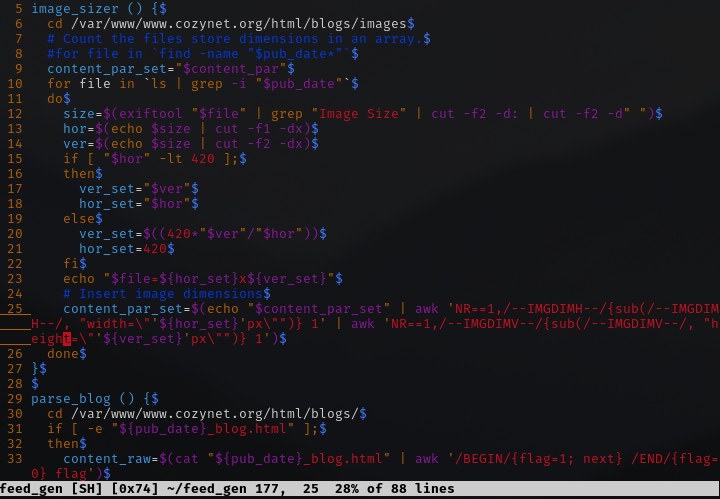
Screenshot of the image sizer function
It's been a long time coming, but I've finally made an RSS feed generator for CozyNet! That's right, I don't have to manually copy stuff over into a feed index file anymore!
Yesterday afternoon I was making a few custom action scripts for my file manager that would resize images down to smaller dimensions and batch rename them to include the date in the file name. Typically each image that I have for a blog post includes the same publish date that's in the filename of the blog post itself. I have it this way so that the images are associated by name to their corresponding post. I did this with the intent for a future RSS feed generator, but never got around to it.
Till now, I've been manually naming the files and resizing them myself, which was laborious, but after scripting it to an easy right click of the mouse and selecting a file action in my file manager, it takes no time or effort on my part anymore.
Feeling inspired, I figured why not try to tackle the RSS feed issue too?
The main problem that I ran into a few years ago when I attempted this the first time was detecting and resizing image dimensions to a standard width for the feed while keeping their aspect ratio. Additionally, some images could be smaller than the standard width and wouldn't need to be resized. I should also mention that unlike my custom action script, the images themselves aren't being resized, but that the sizing is handled by attribute within the HTML img element itself.
The reason that I do this is because a number of RSS feed readers don't adjust the size of images, which can make for an unpleasant viewing for the user scrolling thru a post of full sized images.
Other issues I ran into was in trying to figure out how to parse and clean up HTML.
As I've mentioned before, I prefer a server-side dynamic page generation approach to running websites. The content of a blog post lives on the HTML document file itself (my choice) while most everything else is dynamically generated upon request. Typically the content should live in a database, but I intentionally did it this way so that I could run a search indexer on the site. When I make a new blog post, it's directly made in an HTML editor using a template (or in my case, a souped-up VIM); there's a history here, alright! The completed document is then submitted to the server via rsync and copied into the /blogs/ directory (or created and edited directly on the server too because I can use VIM anywhere!)
Since the HTML document is the source of the blog post, I don't have any other way than to parse that file for a feed, which calls for manual intervention. This means that I have to make a scraper if I do want to script this for a feed, and that's exactly what I did!
Now since this is all happening on the same server, I didn't need to use anything like cURL or WGET. The feed generator script simply stores the target blog post in its entirety into a variable, which is specified by giving the publish date of the blog post; like I said, the publish date is in the name of the HTML file so this greatly simplifies things.
After that, it runs thru a list of sed commands to clean it up because you don't want CSS classes or divs in an RSS feed. It also replaces the HTML width and height size attributes of image elements with a placeholder. Exiftool gets used for detecting the image file dimensions corresponding to the blog post, and with a little cross multiplication and division, the aspect ratio problem is also resolved. The image dimensions are stored into an array and one by one in a for loop the width and height placeholders are swapped out with a standard width and height.
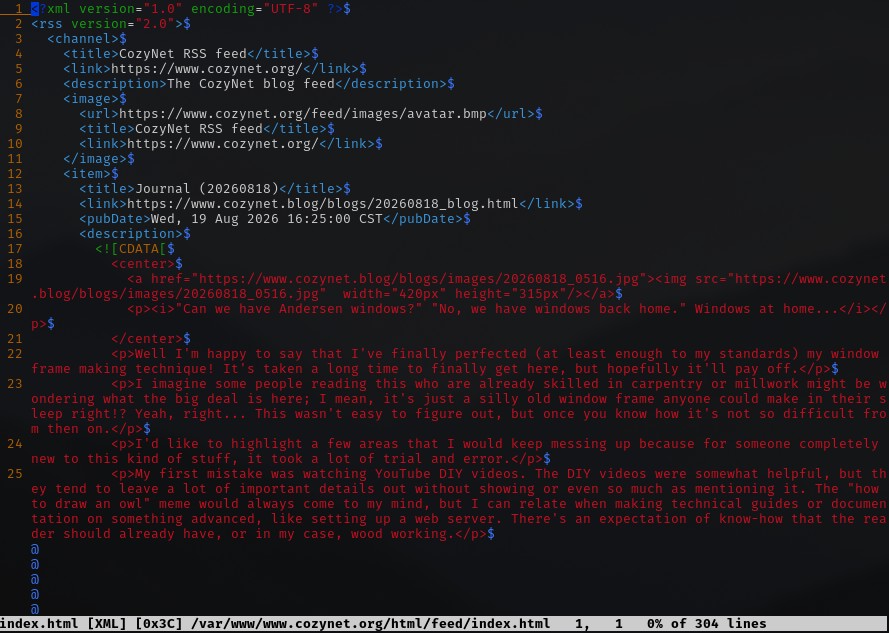
Screenshot of the feed.
Going forward, I will need to include in the naming of the image files an additional digit or two to count their order because the feed generator doesn't actually know what order the images are supposed to be in for the blog post. It's just listing them out by the publish date in the file name and they're ordered by whatever else proceeds in the name, which isn't helpful. Relying on file naming to organize stuff in this manner is probably considered bad form by today's standards, but it's a very small bit of useful information without having to rely on overly complicated metadata tagging systems or databases to manage.
I'm sure there will be some hiccups come along the way that I'll need to tweak the generator script for, but by and large it's functional and does the job!
Thanks for reading my blog!
[Back to top]
Comments: