 Blog
Blog Links
Links Contact
 About
AboutBuilding a blog category tagging system with just PHP, HTML, and some shell scripting
Publish Date: 2026-10-14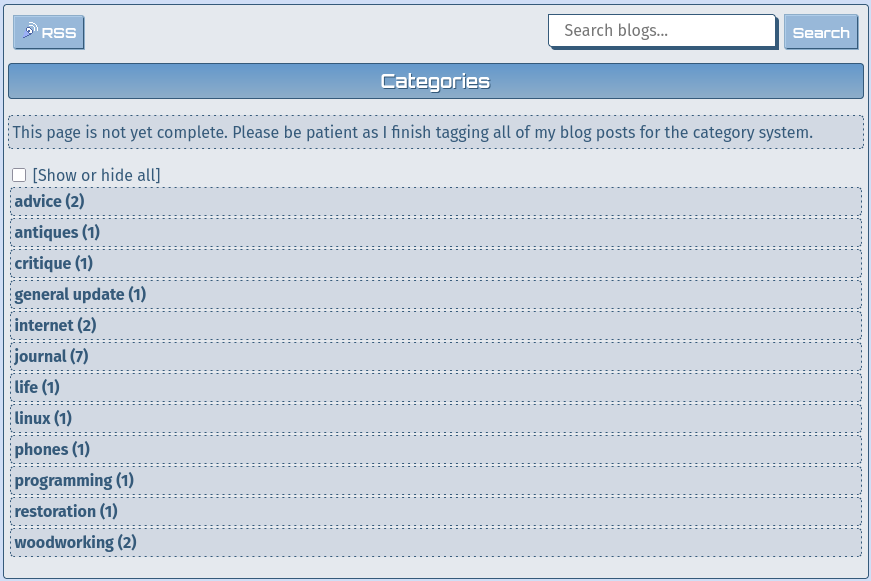
Last week I had some extra time to burn and figured it was time to make a category tagging system for the blog. If anyone reading are familiar with blogs and blogging, a category system is a pretty common staple for navigating and discovering past written blog posts. For example, let's say you want to read my posts on antiques, or perhaps on Linux, you'd have to either scour thru the index or use the search form. Search forms can be useful, but if you don't specifically know what you're looking for, then they lose their purpose.
I've always wanted a category system for CozyNet, but because of how I've made this site, there isn't anything ready-made or off the shelf that I could integrate that would auto-magically work without completely over-hauling the site which is not an option, so I have to make it myself!
And lemme tell you, it's quite a snazzy little system. You can check it out here, or by clicking the "Categories" button on the main blog page. I don't yet have every blog post tagged and indexed, which I'll describe that process here in a bit. I need to fix the Categories button on the main blog page for narrow displays since it conflicts with the search form, but I'll get around to that later.
Now for the fun part; how does it work? So like I said in the title, this is a combination of PHP, HTML, and a shell script...
The most important part is actually the shell script, which is executed in part by a pre-existing updater script that runs a series or chain of other scripts for finalizing and publishing a blog post and general site maintenance. I only run this once after finishing a blog post, so it's not something that's being executed every time you refresh a page.
What the shell script does is enumerates all of the blog posts from a simple file list, then from a for loop it individually parses out the title and an HTML meta tag dedicated for categories from each file. The categories are counted and stored into a variable delimitated with commas, colons, and semi-colons to be later exploded into an array by the PHP script. Another variable associates the file name with its corresponding category tag; there can be multiple results if I tag a blog post for different categories. Then a third variable associates the file name with its title. The titles have to be handled specially because sometimes they might have a quote, a double quote, a comma or semi-colon in them that can throw a wrench into things; it's kind of a nasty little hack to address, but I got it working...
All of this is output to a text file, each variable to its own line, making for three lines in total. This script is quick and finishes within milliseconds, so despite it parsing thru files, it's not a very expensive process and especially since it's only ran once after publishing a new post. The output file is also quite small too. I could store these results in the database for better performance with the PHP portion, but I'm not that strapped for resources here and can afford it.
Now for the PHP script and what it does. Basically, it just pulls in the text file containing the category results, sorts them into arrays, then presents the final result to the client. There's very minimal processing going on here since the results were pre-sorted and organized by the shell script. There's only one line that's manipulating text, and that's just formatting the date.
If you inspect this page, you'll see in the header a meta element containing category tags. All I have to do is type in a category name for the post and the rest is handled by the updater script. I can easily create new categories this way too, but also need to be careful to not change the capitalization or make a spelling error. I'll also need to be consistent in re-using categories rather than willy-nilly make up a new one that's tangentially the same as another, or else this could lead to a lot of unnecessary duplication; basically, they need to be effectively named and utilized. It's very easy to revert though if I do mess things up!
I also made the dedicated categories page HTML and CSS only for revealing and collapsing category options, rather than using javascript here. It's also very functional on text-only browsers too!
The whole shell script is kind of rickety and assumes a very specific file naming convention. The category tags can't have any punctuation in them or it'll break the whole category system too. Since I run this site and I know how it works, it doesn't bother me! If you're interested to see what these look like, then you can download them from the following links and maybe even re-work them to your own purpose.
Note: The "â€" character in the files is supposed to be a dagger "†" which is what I'm using in place of a comma for a delimiter...
Thanks for reading my blog!
[Back to top]
Comments: